Sunday, November 13, 2011

Blog #30 Life "modes" in social media

Life "modes" in social media

Authors : Fatih Kursat Ozenc and Shelly D. Farnha

Authors Bios :
  • Fatih Kursat Ozenc was a PhD student at Carnegie Mellon and is currently looking for a job.
  • Shelly D. Farnha is a researcher at Microsoft Research and has a PhD from the University of Washington
Venue : This paper was presented at the CHI '11 Proceedings of the 2011 annual conference on Human factors in computing systems.

Summary


Blog #29 Usable gestures for blind people: understanding preference and performance

Usable gestures for blind people: understanding preference and performance


Authors : Shaun K. Kane, Jacob O. Wobbrock, and Richard E. Ladner

Authors Bios :

  • Shaun K. Kane:Assistant Professor at the University of Maryland and received his PhD from the University of Washington.
  • Jacob O. Wobbrock: Associate Professor at the University of Washington specializing in human-computer interaction.
  • Richard E. Ladner: Professor at the University of Washington and has a PhD in mathematics from the University of California, Berkeley.Venue : This paper was presented at the CHI '11 Proceedings of the 2011 annual conference on Human factors in computing systems 
Summary
Hypothesis:
Since blind and sighted people have different perceptions and the researchers believed that  touch screen gestures from blind and sighted people would have different ways of performing similar gestures. By knowing these differences one could help designers of applications to be more applicable for everyone and not just the sighted.

Methods:The research was broken into two parts.

First, they had 10 blind participants invent and tell the researchers how they would use gestures on the tablet. And the 10 participants that were not blind were used as the baseline to compare the differences. Each person created a gesture for every command, like exit, delete, copy, paste, move up & down, etc. 

The Seconds part of the study, they were asked to perform the same gestures for certain actions and rate them on a Liker scale.

Results:
The blind found that their made up gestures were better suited for the blind then the sighted people. Text-entry gestures produced mixed results with keyboard being the preferred method by both blind and sighted participants. They also found that the blind group preferred landmarks or performing gestures close to the screen.

Conclusion: 
Based on the results they concluded that they now have a new bases to make applications for both the blind and for the sighted. 

Discussion: 
I feel the researchers did a good job to find out and bring the gap between the blind and the sighted. Since i don't know or deal with blind every day, as a programmer i wouldn't even think or know how to attempt to design a blind person application, and having it in the general standard for applications would be best for the greater good of people. 


Saturday, November 12, 2011

Blog #28 Experimental analysis of touch-screen gesture designs in mobile environments

Experimental Analysis of Touch-Screen Gesture Designs in Mobile Environments

Authors - Andrew Bragdon, Eugene Nelson, Yang Li, and Ken Hinckle


Authors Bios - 
  • Andrew Bragdon- second year PhD student at Brown University focusing on human-computer interaction.
  • Eugene Nelson -PhD student at Brown University.
  • Yang Li- researcher at Google and earned his PhD from the Chinese Academy of Sciences.
  • Ken Hinckley-  Principal Researcher at Microsoft Research and has a PhD from the University of Virginia.
Venue - 
This paper was presented at the CHI '11 Proceedings of the 2011 annual conference on Human factors in computing systems.

Hypothesis- 
The researchers hypothesis is that there are certain ways to control mobile devices by using bezel-initiated gestures and soft buttons that will make it easier to interact. By using buttons they would produce more errors then by using gestures. 

Methods- 
By using different use input types, 15 participants were selected for the study. By looking at hard-button actions, soft button actions, bezel-initiated gestures actions, different ways people sit and stand while using the phone, and testing the distraction level of a person they tested to see what would be better to use on a cell phone. Button pushing, or gestures.

Results-
They found that soft buttons and gestures worked about the same when the user was looking at the phone. However, when the user wasn't looking at the phone, gestures were the easiest and most accurate. Overall, Bezel Gestures were found to be quicker than the other 2 methods of input. 

Conclusion-
The researchers found that using the bezel-gestures were a good shortcut to using a cell phone when one isnt looking at the screen. But using the buttons while looking at the phone didn't effect the users as much as not look at the phone while using the buttons. 

Discussion- 
The researchers found there conclusion and hypothesis to be valid. And maybe some day, the use for gestures on cell phones will be a important part of the market schema to sell a phone. I wouldn't mind to be able to use my phone without needed to unlock the phone every time I try to use it. 


Blog #27 Sensing cognitive multitasking for a brain-based adaptive user interface


Sensing cognitive multitasking for a brain-based adaptive user interface 

Authors:
Erin Treacy Solovey, Francine Lalooses, Krysta Chauncey, Douglas Weaver, Margarita Parasi, Matthias Scheutz, Angelo Sassaroli, Sergio Fantini, Paul Schermerhorn, Audrey Girouard, and Robert J.K. Jacob

Authors Bio:
  • Erin Treacy Solovey- PhD candidate at Tufts University.
  • Francine Lalooses- PhD candidate at Tufts University and has a Bachelor's and Master's degree from Boston University.
  • Krysta Chauncey- post doctorate researcher at Tufts University.
  • Douglas Weaver earned a doctorate degree from Tufts University.
  • Margarita Parasi was earning a Master's degree at Tufts University at the time of this paper's publication.
  • Matthias Scheutz- PhD student at Tufts Universtiy.
  • Angelo Sassaroli is a research assistant professor at Tufts University and earned a PhD from the University of Electro-Communication.
  • Sergio Fantini - professor in the Biomedical Engineering Department at Tufts University.
  • Paul Schermerhorn- post doctorate researcher at Tufts University from Indiana University.
  • Audrey Girouard- assistant professor at The Queen's University and earned a PhD from Tufts University.
  • Robert J.K. Jacob-  professor at Tufts University.
Venue : This paper was presented at the CHI '11 Proceedings of the 2011 annual conference on Human factors in computing systems.

SUMMARY

Hypnosis:
The authors wanted to creat a system for to-do-lists that will allow them to multask using different tasks at once. The believe that tasks will be completed faster as long as the system would understand what the person is thinking.

Methods:
The authors wanted to be able to create a system to measure and handle multitasking mechanisms. They were able to differentiate between three types of multitasking, create studies to measure efficiency for each kind of multitasking technique/condition, to test their system, and prove that it works as well.

Techniques: 
  • Delay
  • Dual Task
  • Branching
12 participants were selected for the study. They practiced a procedure beforehand to get better at the tasks to make sure that they were thinking properly before applying the fNIRS sensor. The users performed 10 40-second trials of each condition.

Results:

Delay tasks were the most accurate and done the quickest. The slowest and least accurate was the branching test. The stresses caused by multitasking were easily seen by the fNIRS data, showing the greatest amount of oxygen depletion with branch-type multitasking.

Discussion/Conclusion: 
The researchers conclude by saying that this thought process should be further explored and tested and they believe that they also built the case for HRI to be relevant to the HCI field.
As said before in other blogs, it would be interesting to see this technology gain some ground and allow the use for computer use in the home. Imagine doing things on the computer without needing to click a button?

Tuesday, November 1, 2011

Blog #26: Embodiment in brain-computer interaction

Embodiment in brain-computer interaction


Authors:  Kenton O’Hara, Abigail Sellen, and Richard Harper


Authors Bios :
  • Kenton O’Hara is a Senior Researcher at Microsoft Research and works in the Socio Digital Systems Group.
  • Abigail Sellen is a Principal Researcher at Microsoft Research and has a PhD from The University of California, San Diego where she studied under Don Norman.
  • Richard Harper is a Principal Researcher at Microsoft Research and has a PhD from Manchester.
Venue : This paper was presented at the CHI '11 Proceedings of the 2011 annual conference on Human factors in computing systems.


SUMMARY


Hypothesis: 
In the paper the authors explored Brain Computer Interaction (BCI) technology, in which they believe could be effectively and harnessed. By exploring BCI, the authors found that they could maximize the current effectiveness on current devices that use BCI. 


Methods:
16 participants were found for the study and were in 4 distinct social groups meaning they knew each other prior to the study. Each group was given a MindFlex game for one week, video recording every play session which was to be analyzed by the researchers once returned.  MindFlex is a commercially available product that measures a user's "focus" and uses that measurement to control a fan that can raise or lift a ball in the air. The more focus detected, the faster the fan blows, the higher the ball floats.


Results:
Participants were found to change their orientation in an attempt to change their level of concentration. Some people held their breath or came in closer to the ball as well. Other people lowered their concentration by not looking at the game. Another way for changing the level of concentration participants used was to imagine the ball moving up. The action of imagination caused more mental activity and caused the ball to move up.


Discussion/Conclusion:
The researchers found that BCI design needs to have physical and movement aspcets to the tools along with mental in order to improve appon BCI. 


Because of the aspects of the idea of using the brain to control things, will revolutionize the industry with products. Programing may become more easy if one could just think about something and on the screen it would implement. I don't know if the technology will ever come to that point, but it would be the day that programing may not be so difficult toe grasp.


Blog #25: Twitinfo: aggregating and visualizing microblogs for event exploration

Twitinfo: aggregating and visualizing microblogs for event exploration 

Authors: Adam Marcus, Michael S. Bernstein, Osama Badar, David R. Karger, Samuel Madden, and Robert C. Miller

Authors Bios:  
  • Adam Marcus is a graduate student at MIT and researches with the Artificial Intelligence Lab.
  • Michael S. Bernstein is a graduate student at MIT with emphasis in human computer interaction.
  • Osama Badar is a student at MIT and also researchers with the Artificial Intelligence Lab.
  • David R. Karger is a professor at MIT and has a PhD from Stanford University.
  • Samuel Madden is an Associate Professor in the EECS department at MIT. 
  • Robert C. Miller is an associate professor at MIT and leads the User Interface Design Group there.
Venue: This paper was presented at the CHI '11 Proceedings of the 2011 annual conference on Human factors in computing systems.


SUMMARY:

Hypothesis: 
The hypothesis is that the researchers think they can build a system that organizes and displays information from twitter in a much more coherent and easily understood manner. So that people can use to understand events quicker than before.


Methods: 
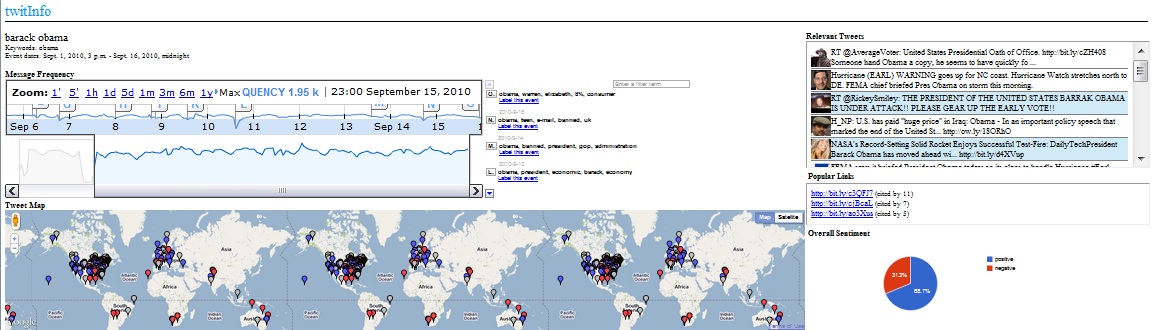
The Researchers created a system called TwitInfo, which was able to Show:
  • 1) The user-defined name of the event, as well as keywords sent to the Twitter Search API to log the tweets.
  • 2) The central timeline interface, with the y-axis corresponding to tweet volume. Automatically-detected peaks (subevents) are labeled with lettered flags. When the user clicks on a peak, all the other interface elements filter to tweets in that time period.
  • 3) Event-related tweets with geolocation are displayed on a map. 
  • 4) Tweets for the currently selected event or peak (subevent), colored red if TwitInfo detects negative sentiment or blue if TwitInfo detects positive sentiment.
  • 5) The most popular links in the currently-selected event or subevent.
  • 6) Aggregated sentiment of all tweets in the event or subevent.
First, to evaluate the TwitInfo, the researchers recruited twelve participants, six of whom had Twitter accounts. They asked the participants to perform directed search tasks for the first half of the study. Their tasks were used to exercise all the elements of the interface and allowed us to gather feedback on a variety of usage scenarios.

The second half of the study was a time-limited exploration task. They gave participants up to five minutes to understand an event using TwitInfo and five minutes to dictate a news report on the event to the experimenter.

Lastly they were given a interview on there opinions about the program. 

Results: 
The researchers found that the system was quite accurate but reported many false positives.  They also found that interest is a significant factor in finding information meaning an event that happens in a minor area or an undeveloped area is more likely to go unnoticed in TwitInfo. The timeline was found to be the most useful part of the interface for most participants. Users also reported that the map would have been more interesting if volume was reflected in the display so as to show where events had the greatest impact.

Conclusion:
TwitInfo is a novel microblog-based event tracking interface that can collect, aggregate, and visualize tweets about user-specified events as they unfold on the stream. TwitInfo embeds a novel algorithm for peak detection and labeling, as well as a new technique for correcting aggregate sentiment displays. Since Twitter is quickly becoming a news reporting site for many people so something like TwitInfo could be very useful to them in getting an overview of information quickly.

Discussion: 
 The researchers achieved there goal on creating a microblog Twitter event scanner. By using there program, using twitter to gain news seems to be much more relevant. 


Thursday, October 27, 2011

Blog #24- Gesture avatar: a technique for operating mobile user interfaces using gestures

Gesture Avatar: a technique for operating mobile user interfaces using gestures

Authors:
Hao Lu  and Yang Li

Author Bios:
  • Hao Lu- graduate student at University of Washington Computer Science & Engineering and DUB Group. I work on technologies that change and improve the way how people interact with computers.
  • Yang Li-  Senior Research Scientist at Google. Before joining Google's research team, Yang was a Research Associate in Computer Science & Engineering at the University of Washington 
Presented at CHI 2011, May 7-12, 2011, Vancouver, British Columbia, Canada

SUMMARY: 

Hypothesis:
Finger-based touch input has become a major interaction modality for mobile user interfaces. The researchers of the paper think, if using gesture methods to operate mobile interfaces performs optimally over finger-based touch input, then in a dynamic mobile environment, they believe it will prevail.

Methods:
Touchscreen mobile devices struggle with low precision due to the size of fingers and covering up the target. Increasing the size of widgets is not always feasible. The authors developed Gesture Avatar, which combines the visibility of traditional GUIs and the casual interaction of gestures.Using the Gesture Avatar, the user can create user defined gestures that the program will know, and interact with the programs accordingly to the user.

To test the program they had participants walk on a treadmill. The participants were split in half, and some used Shift (an alternative technique for target acquisition tasks) then used  Gesture Avatar, and then vice versa for the other group. For each technique, the task was performed while sitting and walking.

Results:
The user study conducted showed that compared to Shift , Gesture Avatar performed at a much lower error rate on various target sizes and significantly faster on small targets (1mm). 

Conclusion: 
The researchers of the paper concluded there hypothesis and found that the Avatar gesture system that they created out performed preexisting tools. Their user test were comprehensive in the range of variables,and Gesture Avatar performs better than Shift in a number of ways displayed in the paper.

Discussion:
With the cell phone generation becoming more complex every year, and new models of phones coming out onto the market. I hope that one day, phones will me more precise to what the user wants to press. So a Program like Gesture Avatar, may actually be that stepping stone to which navigating on a cell phone screen will be easier then ever before.