Sunday, November 13, 2011

Blog #30 Life "modes" in social media

Life "modes" in social media

Authors : Fatih Kursat Ozenc and Shelly D. Farnha

Authors Bios :
  • Fatih Kursat Ozenc was a PhD student at Carnegie Mellon and is currently looking for a job.
  • Shelly D. Farnha is a researcher at Microsoft Research and has a PhD from the University of Washington
Venue : This paper was presented at the CHI '11 Proceedings of the 2011 annual conference on Human factors in computing systems.

Summary


Blog #29 Usable gestures for blind people: understanding preference and performance

Usable gestures for blind people: understanding preference and performance


Authors : Shaun K. Kane, Jacob O. Wobbrock, and Richard E. Ladner

Authors Bios :

  • Shaun K. Kane:Assistant Professor at the University of Maryland and received his PhD from the University of Washington.
  • Jacob O. Wobbrock: Associate Professor at the University of Washington specializing in human-computer interaction.
  • Richard E. Ladner: Professor at the University of Washington and has a PhD in mathematics from the University of California, Berkeley.Venue : This paper was presented at the CHI '11 Proceedings of the 2011 annual conference on Human factors in computing systems 
Summary
Hypothesis:
Since blind and sighted people have different perceptions and the researchers believed that  touch screen gestures from blind and sighted people would have different ways of performing similar gestures. By knowing these differences one could help designers of applications to be more applicable for everyone and not just the sighted.

Methods:The research was broken into two parts.

First, they had 10 blind participants invent and tell the researchers how they would use gestures on the tablet. And the 10 participants that were not blind were used as the baseline to compare the differences. Each person created a gesture for every command, like exit, delete, copy, paste, move up & down, etc. 

The Seconds part of the study, they were asked to perform the same gestures for certain actions and rate them on a Liker scale.

Results:
The blind found that their made up gestures were better suited for the blind then the sighted people. Text-entry gestures produced mixed results with keyboard being the preferred method by both blind and sighted participants. They also found that the blind group preferred landmarks or performing gestures close to the screen.

Conclusion: 
Based on the results they concluded that they now have a new bases to make applications for both the blind and for the sighted. 

Discussion: 
I feel the researchers did a good job to find out and bring the gap between the blind and the sighted. Since i don't know or deal with blind every day, as a programmer i wouldn't even think or know how to attempt to design a blind person application, and having it in the general standard for applications would be best for the greater good of people. 


Saturday, November 12, 2011

Blog #28 Experimental analysis of touch-screen gesture designs in mobile environments

Experimental Analysis of Touch-Screen Gesture Designs in Mobile Environments

Authors - Andrew Bragdon, Eugene Nelson, Yang Li, and Ken Hinckle


Authors Bios - 
  • Andrew Bragdon- second year PhD student at Brown University focusing on human-computer interaction.
  • Eugene Nelson -PhD student at Brown University.
  • Yang Li- researcher at Google and earned his PhD from the Chinese Academy of Sciences.
  • Ken Hinckley-  Principal Researcher at Microsoft Research and has a PhD from the University of Virginia.
Venue - 
This paper was presented at the CHI '11 Proceedings of the 2011 annual conference on Human factors in computing systems.

Hypothesis- 
The researchers hypothesis is that there are certain ways to control mobile devices by using bezel-initiated gestures and soft buttons that will make it easier to interact. By using buttons they would produce more errors then by using gestures. 

Methods- 
By using different use input types, 15 participants were selected for the study. By looking at hard-button actions, soft button actions, bezel-initiated gestures actions, different ways people sit and stand while using the phone, and testing the distraction level of a person they tested to see what would be better to use on a cell phone. Button pushing, or gestures.

Results-
They found that soft buttons and gestures worked about the same when the user was looking at the phone. However, when the user wasn't looking at the phone, gestures were the easiest and most accurate. Overall, Bezel Gestures were found to be quicker than the other 2 methods of input. 

Conclusion-
The researchers found that using the bezel-gestures were a good shortcut to using a cell phone when one isnt looking at the screen. But using the buttons while looking at the phone didn't effect the users as much as not look at the phone while using the buttons. 

Discussion- 
The researchers found there conclusion and hypothesis to be valid. And maybe some day, the use for gestures on cell phones will be a important part of the market schema to sell a phone. I wouldn't mind to be able to use my phone without needed to unlock the phone every time I try to use it. 


Blog #27 Sensing cognitive multitasking for a brain-based adaptive user interface


Sensing cognitive multitasking for a brain-based adaptive user interface 

Authors:
Erin Treacy Solovey, Francine Lalooses, Krysta Chauncey, Douglas Weaver, Margarita Parasi, Matthias Scheutz, Angelo Sassaroli, Sergio Fantini, Paul Schermerhorn, Audrey Girouard, and Robert J.K. Jacob

Authors Bio:
  • Erin Treacy Solovey- PhD candidate at Tufts University.
  • Francine Lalooses- PhD candidate at Tufts University and has a Bachelor's and Master's degree from Boston University.
  • Krysta Chauncey- post doctorate researcher at Tufts University.
  • Douglas Weaver earned a doctorate degree from Tufts University.
  • Margarita Parasi was earning a Master's degree at Tufts University at the time of this paper's publication.
  • Matthias Scheutz- PhD student at Tufts Universtiy.
  • Angelo Sassaroli is a research assistant professor at Tufts University and earned a PhD from the University of Electro-Communication.
  • Sergio Fantini - professor in the Biomedical Engineering Department at Tufts University.
  • Paul Schermerhorn- post doctorate researcher at Tufts University from Indiana University.
  • Audrey Girouard- assistant professor at The Queen's University and earned a PhD from Tufts University.
  • Robert J.K. Jacob-  professor at Tufts University.
Venue : This paper was presented at the CHI '11 Proceedings of the 2011 annual conference on Human factors in computing systems.

SUMMARY

Hypnosis:
The authors wanted to creat a system for to-do-lists that will allow them to multask using different tasks at once. The believe that tasks will be completed faster as long as the system would understand what the person is thinking.

Methods:
The authors wanted to be able to create a system to measure and handle multitasking mechanisms. They were able to differentiate between three types of multitasking, create studies to measure efficiency for each kind of multitasking technique/condition, to test their system, and prove that it works as well.

Techniques: 
  • Delay
  • Dual Task
  • Branching
12 participants were selected for the study. They practiced a procedure beforehand to get better at the tasks to make sure that they were thinking properly before applying the fNIRS sensor. The users performed 10 40-second trials of each condition.

Results:

Delay tasks were the most accurate and done the quickest. The slowest and least accurate was the branching test. The stresses caused by multitasking were easily seen by the fNIRS data, showing the greatest amount of oxygen depletion with branch-type multitasking.

Discussion/Conclusion: 
The researchers conclude by saying that this thought process should be further explored and tested and they believe that they also built the case for HRI to be relevant to the HCI field.
As said before in other blogs, it would be interesting to see this technology gain some ground and allow the use for computer use in the home. Imagine doing things on the computer without needing to click a button?

Tuesday, November 1, 2011

Blog #26: Embodiment in brain-computer interaction

Embodiment in brain-computer interaction


Authors:  Kenton O’Hara, Abigail Sellen, and Richard Harper


Authors Bios :
  • Kenton O’Hara is a Senior Researcher at Microsoft Research and works in the Socio Digital Systems Group.
  • Abigail Sellen is a Principal Researcher at Microsoft Research and has a PhD from The University of California, San Diego where she studied under Don Norman.
  • Richard Harper is a Principal Researcher at Microsoft Research and has a PhD from Manchester.
Venue : This paper was presented at the CHI '11 Proceedings of the 2011 annual conference on Human factors in computing systems.


SUMMARY


Hypothesis: 
In the paper the authors explored Brain Computer Interaction (BCI) technology, in which they believe could be effectively and harnessed. By exploring BCI, the authors found that they could maximize the current effectiveness on current devices that use BCI. 


Methods:
16 participants were found for the study and were in 4 distinct social groups meaning they knew each other prior to the study. Each group was given a MindFlex game for one week, video recording every play session which was to be analyzed by the researchers once returned.  MindFlex is a commercially available product that measures a user's "focus" and uses that measurement to control a fan that can raise or lift a ball in the air. The more focus detected, the faster the fan blows, the higher the ball floats.


Results:
Participants were found to change their orientation in an attempt to change their level of concentration. Some people held their breath or came in closer to the ball as well. Other people lowered their concentration by not looking at the game. Another way for changing the level of concentration participants used was to imagine the ball moving up. The action of imagination caused more mental activity and caused the ball to move up.


Discussion/Conclusion:
The researchers found that BCI design needs to have physical and movement aspcets to the tools along with mental in order to improve appon BCI. 


Because of the aspects of the idea of using the brain to control things, will revolutionize the industry with products. Programing may become more easy if one could just think about something and on the screen it would implement. I don't know if the technology will ever come to that point, but it would be the day that programing may not be so difficult toe grasp.


Blog #25: Twitinfo: aggregating and visualizing microblogs for event exploration

Twitinfo: aggregating and visualizing microblogs for event exploration 

Authors: Adam Marcus, Michael S. Bernstein, Osama Badar, David R. Karger, Samuel Madden, and Robert C. Miller

Authors Bios:  
  • Adam Marcus is a graduate student at MIT and researches with the Artificial Intelligence Lab.
  • Michael S. Bernstein is a graduate student at MIT with emphasis in human computer interaction.
  • Osama Badar is a student at MIT and also researchers with the Artificial Intelligence Lab.
  • David R. Karger is a professor at MIT and has a PhD from Stanford University.
  • Samuel Madden is an Associate Professor in the EECS department at MIT. 
  • Robert C. Miller is an associate professor at MIT and leads the User Interface Design Group there.
Venue: This paper was presented at the CHI '11 Proceedings of the 2011 annual conference on Human factors in computing systems.


SUMMARY:

Hypothesis: 
The hypothesis is that the researchers think they can build a system that organizes and displays information from twitter in a much more coherent and easily understood manner. So that people can use to understand events quicker than before.


Methods: 
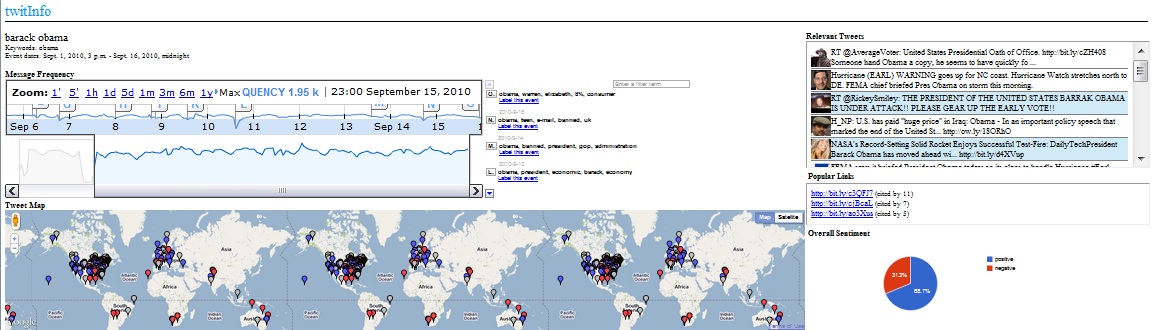
The Researchers created a system called TwitInfo, which was able to Show:
  • 1) The user-defined name of the event, as well as keywords sent to the Twitter Search API to log the tweets.
  • 2) The central timeline interface, with the y-axis corresponding to tweet volume. Automatically-detected peaks (subevents) are labeled with lettered flags. When the user clicks on a peak, all the other interface elements filter to tweets in that time period.
  • 3) Event-related tweets with geolocation are displayed on a map. 
  • 4) Tweets for the currently selected event or peak (subevent), colored red if TwitInfo detects negative sentiment or blue if TwitInfo detects positive sentiment.
  • 5) The most popular links in the currently-selected event or subevent.
  • 6) Aggregated sentiment of all tweets in the event or subevent.
First, to evaluate the TwitInfo, the researchers recruited twelve participants, six of whom had Twitter accounts. They asked the participants to perform directed search tasks for the first half of the study. Their tasks were used to exercise all the elements of the interface and allowed us to gather feedback on a variety of usage scenarios.

The second half of the study was a time-limited exploration task. They gave participants up to five minutes to understand an event using TwitInfo and five minutes to dictate a news report on the event to the experimenter.

Lastly they were given a interview on there opinions about the program. 

Results: 
The researchers found that the system was quite accurate but reported many false positives.  They also found that interest is a significant factor in finding information meaning an event that happens in a minor area or an undeveloped area is more likely to go unnoticed in TwitInfo. The timeline was found to be the most useful part of the interface for most participants. Users also reported that the map would have been more interesting if volume was reflected in the display so as to show where events had the greatest impact.

Conclusion:
TwitInfo is a novel microblog-based event tracking interface that can collect, aggregate, and visualize tweets about user-specified events as they unfold on the stream. TwitInfo embeds a novel algorithm for peak detection and labeling, as well as a new technique for correcting aggregate sentiment displays. Since Twitter is quickly becoming a news reporting site for many people so something like TwitInfo could be very useful to them in getting an overview of information quickly.

Discussion: 
 The researchers achieved there goal on creating a microblog Twitter event scanner. By using there program, using twitter to gain news seems to be much more relevant. 


Thursday, October 27, 2011

Blog #24- Gesture avatar: a technique for operating mobile user interfaces using gestures

Gesture Avatar: a technique for operating mobile user interfaces using gestures

Authors:
Hao Lu  and Yang Li

Author Bios:
  • Hao Lu- graduate student at University of Washington Computer Science & Engineering and DUB Group. I work on technologies that change and improve the way how people interact with computers.
  • Yang Li-  Senior Research Scientist at Google. Before joining Google's research team, Yang was a Research Associate in Computer Science & Engineering at the University of Washington 
Presented at CHI 2011, May 7-12, 2011, Vancouver, British Columbia, Canada

SUMMARY: 

Hypothesis:
Finger-based touch input has become a major interaction modality for mobile user interfaces. The researchers of the paper think, if using gesture methods to operate mobile interfaces performs optimally over finger-based touch input, then in a dynamic mobile environment, they believe it will prevail.

Methods:
Touchscreen mobile devices struggle with low precision due to the size of fingers and covering up the target. Increasing the size of widgets is not always feasible. The authors developed Gesture Avatar, which combines the visibility of traditional GUIs and the casual interaction of gestures.Using the Gesture Avatar, the user can create user defined gestures that the program will know, and interact with the programs accordingly to the user.

To test the program they had participants walk on a treadmill. The participants were split in half, and some used Shift (an alternative technique for target acquisition tasks) then used  Gesture Avatar, and then vice versa for the other group. For each technique, the task was performed while sitting and walking.

Results:
The user study conducted showed that compared to Shift , Gesture Avatar performed at a much lower error rate on various target sizes and significantly faster on small targets (1mm). 

Conclusion: 
The researchers of the paper concluded there hypothesis and found that the Avatar gesture system that they created out performed preexisting tools. Their user test were comprehensive in the range of variables,and Gesture Avatar performs better than Shift in a number of ways displayed in the paper.

Discussion:
With the cell phone generation becoming more complex every year, and new models of phones coming out onto the market. I hope that one day, phones will me more precise to what the user wants to press. So a Program like Gesture Avatar, may actually be that stepping stone to which navigating on a cell phone screen will be easier then ever before. 


Tuesday, October 25, 2011

Blog #23: User-Defined Motion Gestures for Mobile Interaction

User-Defined Motion Gestures for Mobile Interaction

Authors : Jaime Ruiz, Yang Li, and Edward Lank

Authors Bios:
  • Jaime Ruiz is a PhD student at the University of Waterloo and has been a visiting researcher at the Palo Alto Research Center.
  • Yang Li is a researcher at Google and earned his PhD from the Chinese Academy of Sciences.
  • Edward Lank is an Assistant Professor at the University of Waterloo and has a PhD from Queen's University.

Venue: This paper was presented at the CHI '11 Proceedings of the 2011 annual conference on Human factors in computing systems.

Summary:

Hypothesis: 
The researchers conducted a study to see what people view as being useful for certain tasks with different motion gestures with a cellphone. Their hypothesis was that by developing a new standard for motion gestures, users will be able to finally use motion gestures in the regular market. 

Methods: 
20 participants, were given tasks developed by the researchers that have a set of motion gestures that are intuitive to certain tasks. By locking a phones screen and not having any feedback from the phone when doing operations, the participants had to do certain actions and movements with the phone to do operations. Example: putting the phone to your face will answer a phone call. After there exercises with the phones, they were given survey's to look at how they were doing. 

Results: 
The  common themes were:
  • Mimic Normal Use - A majority of participants preferred natural gestures for common tasks that already involved that motion (putting phone to ear)
  • Real-World Metaphors - Gesturing the phone as a non-mobile phone object and using it appropriately (hanging a phone up by turning it face down)
  • Natural and Consistent Mappings - doing what users expect (right for one thing and left for the opposite)
  • Providing Feedback - confirmation of actions happening and during the action.
 The researchers had found 380 different gestures that were performed in the excercies. They combined all the resulsts into a mapping diagram.  
Conclusion: 
The researchers concluded that there is definite need for followup research, but they believe that they are on  the correct path for developing a standard for intuitive input methods for mobile devices. 

Discussion: 
Their goal was met on setting the foundation of motion gestures for the industry. Some day, someone may actually be able to "text" and drive without it being to dangerous. They wouldn't call it texting then, because most of the gestures would probably be by voice, it sounds exciting anyways. More then likely these will be implemented in the next generation of phones, and will be the standard for all the companies.


Blog #22 Mid-air pan-and-zoom on wall-sized displays

Mid-air pan-and-zoom on wall-sized displays


Authors: Mathieu Nancel, Julie Wagner, Emmanuel Pietriga, Olivier Chapuis, and Wendy Mackay

Authors Bios:
  • Mathieu Nancel is a Ph.D. student in Human-Computer Interactions in the insitu team at the University of Paris-Sud.
  • Julie Wagner is a Postgraduate Research Assistant at the insitu lab and has a Master's from RWTH Aachen University.
  • Emmanuel Pietriga is the interim leader of the insitu lab and has a PhD from Institut National Polytechnique de Grenoble.
  • Olivier Chapuis is a team co-head (by interim) of the InSitu research team and has a PhD from the University of Paris VII Diderot.
  • Wendy Mackay is a Research Director with INRIA Saclay in France and has a PhD from MIT.
Venue : This paper was presented at the CHI '11 Proceedings of the 2011 annual conference on Human factors in computing systems.

Summary:

Hypothesis: 
The authors claim that wall-sized displays are going to be the future, and yet have no standard for interaction. Their hypothesis is, with a series of possible interaction techniques with display, the future of mid-air interactions will be more effective than traditional hardware. (Better then using a remote!)

Methods:
In order to test their hypothesis, they proposed several possible interactions they narrowed the gestures down to 3 key dimensions: Hands, Gestures, and Degree of Guidance. The degree of guidance dimension has the researchers questioning the right feedback to give users as they interact in a primarily free space. So they tried feedback from using 1D 2D and 3D Input. 

12 unique interaction techniques were used in the study. Which the techniques will come from  linear and circular gestures in both uni-manual and bi manual modes. The researchers expected:
  • Two handed gestures will be preferred to one handed gestures and be more accurate
  • Linear gestures will be preferred for zooming actions while circular gestures will be preferred for everything else
  • 1D and 2D gestures will be faster than 3D gestures
  • 1D gestures will be the fastest and 3D gestures will be the most tiring
The 12 participants tested these gestures on a wall-sized display consisting of 32 screens. The participants were also ranked while they were required to navigate and zoom appropriately among a series of circles with some designated as targets that should be focused on.

Results: 
After the experiment, the authors found that the two-handed gesture tasks were performed faster than the one-handed gesture tasks, involving smaller muscle groups for input interactions improves performance and linearly-performed tasks were generally performed faster than circular ones. Circular gestures were slower because it was more often that participants overshot their target with circular gestures than with linear ones. The fastest overall gestures were two-handed linear ones in both the 1D and 2D space.

Conclusion:
In the paper the researchers stated that 1D and 2D spaces performed well in the experiment and shouldn't be forgotten to lower common errors that users performed. The researchers reached their goal and were successful to find gestures that work on these giant displays. And even got surprises in the long run. 

Discussion: 
I found it more isntresting that the hardware based input methods were found to be preferable in many cases, instead of hand gestures. I can't wait to see wall sized displays in my houses, or even in the hall ways in public, it might be a very colorful future for wall displays. 

Thursday, October 20, 2011

Blog #20: The aligned rank transform for nonparametric factorial analyses using only anova procedures

The Aligned Rank Transform for Nonparametric Factorial Analyses Using Only ANOVA Procedures


Authors - Jacob O. Wobbrock, Leah Findlater, Darren Gergle, and James J. Higgins

Authors Bios -
  • Jacob O. Wobbrock is an Associate Professor at the University of Washington and has a PhD from Carnegie Mellon University.
  • Leah Findlater will be an Assistant Professor at the University of Maryland next year, has taught at the University of Washington, and has a PhD from the University of British Columbia.
  • Darren Gergle is an Associate Professor at Northwestern University and has a PhD from Carnegie Mellon University.
  • James J. Higgins is a Professor of Statistics at Kansas State University and has a PhD from the University of Missouri-Columbia.
Venue - This paper was presented at the CHI '11 Proceedings of the 2011 annual conference on Human factors in computing systems.
SUMMARY
Hypothesis:
The researchers explain that common procedures used in analyzing non-parametric data tend to be error prone and propose a new system for analyzing data. This new procedure, called the Aligned Rank Transform (ART). The hypothesis is that ART is a better way to analyze data than any other method currently in use in HCI and can be very useful in real world applications


Content:
What ART does is it corrects requirements of ANOVA statistics that are not necessarily ture in HCI. An example of this is normality. To do this, residuals are computed, estimated effects for interactions are computed, aligned responses are computed, average ranks are assigned, ANOVA on this new data is performed, and correctness is check by checking sums.
Methods:
The ART procedure consists of 5 steps: 
  1. Computing residuals: for each raw response Y, compute residual = Y - cell mean
  2. Computing estimated effects for all main and interaction effects: these are calculated such that Ai is the mean response Yi for rows where factor A is at level i. AiBj is the mean response Yij for rows where factor A is at level i and factor B is at level j. And so on.
  3. computing the aligned response Y', assigning average ranks Y'' where Y' = residual + estimated effect.
  4. performing a full-factorial ANOVA on Y''
Results:
The results were analyzed using a standard ANOVA first and then an ART to see if any observable interaction concurred in the study. The ANOVA did not detect anything and noted their was no significant interaction but the ART found significant interaction and questioned the findings found earlier which agrees with the researchers initial perception that interaction was obviously present.


Conclusion: The researchers found that ART is useful when analyzing non-parametric data and has been useful in several cases that the researchers had worked on.


Discussion:
This paper was at a very techincal level of understanding. I was fortunate enough to have statistics and at least know what ANOVA was. The researchers achieve their goal of providing a better way to provide to analyze data for HCI research. Its good that they can find anomalies by using ART.


Blog #21: Human model evaluation in interactive supervised learning

 Human model evaluation in interactive supervised learning

Authors : Rebecca Fiebrink, Perry R. Cook, and Daniel Truema


Authors Bios:
  • Rebecca Fiebrink:  assistant professor at Princeton University in the department of computer science and music and has a PhD from Princeton.
  •  Perry R. Cook : professor emeritus at Princeton University and has a PhD from Stanford. 
  • Daniel Truema : music courses at Princeton University and is an accomplished composer and performer on the fiddle and laptop.

Venue : This paper was presented at the CHI '11 Proceedings of the 2011 annual conference on Human factors in computing systems.

Summary

Hypothesis: 
Knowing why machines have certain outputs that are generate are one of many things that one may not get to understand. The researchers proposed a system that allows trainers to supervise machine learning because current ones provide little or no feedback. Which will allow them to find out why some problems may happen and they could fix those problems. They hypothesized that a system with the capabilities of knowing why certain output is generated, will allow us to make better machines. 

Methods: 
The researchers made a tool called, Wekinator, which would record physical gesters using musical intrements and label them. Then the researchers conducted three studies of people applying supervised learning to their work in computer music.
  • The first study consisted of 7 composers working to refine the Wekinator to control new instruments that existed on the computer only and responded to gesture input. The participants trained the system once a week and made suggestions that were acted upon in between sessions.
  • The second study focused on the supervised learning aspect of the system and observed 21 students in their use of the Wekinator to produce new instruments controlled by certain gestures (one continuously controlled adjusting to changes in gesture in real-time). The students' actions were recorded by the software and they filled out questionnaires.
  • The final study consisted of a professional cellist working with the researchers to classify several gestures that capture many properties of a bow as it is used to play the cello. This bow, called the “K-Bow". After the system captures this data, it should be able to capture the notes being played and add them to a composition on a computer.
Results:
In the first study, participants found that the algorithms used to control the sound were difficult to control in a musically satisfying way using either a GUI or an explicitly controlled sequence.

The second study, users in the second study indicated that they considered high levels of cross validation accuracy to be indicative of good performance, and made use of it.

In the Third study, also used high levels of Cross validation. but direct evaluation was used more frequently in all 3 studies and allowed for quick validation that a system was performing as expected.

Concussion:
The researchers presented there work and concluded that supervised learning models intended to be ultimately used in interactive contexts and should be evaluated with attention to the model qualities important to users in those contexts. So basically, users must evaluate what qualities they are looking for beforehand because there simply isn't enough tools to know all.

Discussion:
The researchers did accomplish their goal of gathering useful data regarding evaluation of supervised learning systems, and I think that this work will be very beneficial in the future. Imagine writing a program or operating system that has no bugs!


Tuesday, October 18, 2011

Blog #19: Reflexivity in digital anthropology

Reflexivity in digital anthropology


Authors : Jennifer A. Rod

Authors Bios: Jennifer A. Rod: Assistant Professor at Drexel's School of Information and has a PhD in Computer Science from UC Irvine.

Venue - This paper was presented at the CHI '11 Proceedings of the 2011 annual conference on Human factors in computing systems.

Summary:

Hypothesis: The paper overviews key aspects its use in HCI, as well as in the anthropological approach. Her hypothesis is that studies can better understand how effectively the use of different types of ethnography can make HCI research  better and easier in the future. 


Methods: Jennifer A. Rod explained 3 different types of ethnography approaches that can be  appled to HCI, although only one is currently used in digital anthropology.
  • realist approach: focuses on the process of collecting information over a long period of time and determining causes for what was observed
  • confessional approach : relies on the ethnographer explaining their own involvement with the subject being studied and allows for a greater understanding of the perspective being observed.
  • impressionistic approach : focuses on telling a story and letting detailed observation speak for itself in setting the stage for the ethnography and allowing for future analysis. 
Using these approaches, and having different points of view in gathering data would allow for the most optimal answers that one might have when doing an ethnography.  

Results: Three types of ethnographies could be created out of the 3 approaches listed above.

  • Formative Ethnographies: study current use of a product or tool and make observations as to how it can be improved. 
  • Summative Ethnographies: focus purely on how a digital tool is used by a specific group of people and explain this relationship in depth with no suggestions for improvement.
  • Iteratively Evaluative Ethnographies: studies that are conducted by putting a prototype product or tool in use and studying how it becomes used, then evaluate it all over again in another study. 
Conclusion:  Dr. Rod concludes the paper by stating that standards need to be adopted for ethnography in HCI in order to continue improving on technology and its relationship with users. By following the different approaches for ethnographies, one would have many different results, and conclude on more answers then needed. 

Discussion:  To better HCI for the future, and to allow user interfaces to become better will be the future of the industry. But my personal opinion, maybe technology shouldn't be taken for granted, and i hope that humans can embraces technology, but shouldn't have there lived ruled by technology. It is good to research technology, better interaction in technology is a good thing, but it may defeat our culture ultimately.

Thursday, October 13, 2011

Blog #18: Biofeedback game design: using direct and indirect physiological control to enhance game interaction


Biofeedback game design: using direct physiological control to enhance game interaction
Authors:  Lennart E. Nacke, Michael Kalyn, Calvin Lough, and Regan L. Mandryk

Authors Bios: Lennart E. Nacke was a postdoctoral associate researcher at the University of Saskatchewan at the time of this paper's publication.

Michael Kalyn is a student researcher at the University of Saskatchewan and holds a degree in Computer Engineering.

Calvin Lough is also a researcher working under Dr. Mandryk in the Interaction Lab at the University of Saskatchewan.

Regan L. Mandryk is an Assistant Professor at the University of Saskatchewan and has a PhD from Simon Fraser University.

Venue - This paper was presented at the CHI '11 Proceedings of the 2011 annual conference on Human factors in computing systems.

Summary:

Hypothesis: The researchers explored the physiological input in video games to see if they could be using in the modern video game industry. There hypothesis is that physiological input will be the future of modern gaming. 

Methods: The researchers had build a 2D side scrolling shooter game using Microsoft XNA and the use of a Xbox 360 controller. The game had many physiological controls other then controller input. They added:
  • GAZE - Eye tracking
  • EMG - Muscle sensor
  • GSR - Sweat detection
  • EKG - Heart Rate sensor
  • RESP - Breathing rate sensor
  • TEMP - Temperature sensor (require blowing on)
10 Participants were asked to play through 3 test levels on the video game. The first had a condition where there were no physiological controls other then the Xbox controller (which satisfies as the control of the experiment). The other 2 levels had indirect and direct methods of physiological control. GAZE (which followed where the user was looking on the screen to aim the gun) was used on both test levels. The participants were set to play the levels in random order for 10 minutes at a time, then filled out a survey about their experience with the physiological controls.

Results: The participants found that the physiological controls were significantly more fun then the control level, but had no preference to which level of the game they liked. the participants all liked the GAZE feature and RESP sensors more then the others, so they naturally chose the direct controls over indirect controls. 

Conclusion: The researchers proved there goal that physiological input if feasible to implement into modern games by using more of a direct control format other then indirect, like the EKG monitor. But they do believe that the indirect variables could control how the user is represented or sees the environment they are in while playing a game, ie: if there heart rate jumps up, maybe the screen will start to pulsate and blur a little, giving the sense of one that might be in that situation. 

Discussion: I loved the idea that having a physiological input could be used to enhance game play. One day i would love to play a game that would be more about your physical ability more then how good you can move your figures left and right to determine the best player... Granted that game my lose a lot of popularity because majority of the gaming market i would say in physically weaker. 


Sunday, October 9, 2011

Blog #17: Privacy risks emerging from the adoption of innocuous wearable sensors in the mobile environment

Privacy Risks Emerging from the Adoption of Innocuous Wearable Sensors in the Mobile Environment

Authors: Andrew Raij, Animikh Ghosh, Santosh Kumar, and Mani Srivastava

Authors Bios:
Andrew Raij- a Post Doctoral Fellow in the Wireless Sensors and Mobile Ad Hoc Networks Lab (WiSe MANet) at the University of Memphis and has a PhD from the University of Florida.

Animikh Ghosh - a Junior Research Associate at Infosys Technologies Ltd. and has a Masters of Computer Science from the University of Memphis.

Santosh Kumar - an Associate Professor at the University of Memphis and advises the WiSeMANet Lab.
Mani Srivastava is a Professor of Computer Science at UCLA and is also highly involved as an electrical engineer.

Venue : This paper was presented at the CHI '11 Proceedings of the 2011 annual conference on Human factors in computing systems

Summary


Hypothesis:
The reasearchers of the paper pointed out that mobile sensors that are used to study one's health can also be used for learning new algorithms. Their hypothoses was based on how much individuals care about their private habits being made public; and the researchers believe that people don't want certain personal attributes like health conditions, dictate how people will treat them in the workplace, or use against them.

Methods:
The developers made a framework to better explain the scenario being discussed in the paper and it consisted of

  •  measurements - raw data that comes from sensors such as acclerometer readings and heart rates.
  •  behavior - actions the user performed that can be inferred from the measurements such as seizures.
  •  context - explain behaviors by observing the environment that the behavior occurred in such as time,   place, and people that were nearby.
  • restrictions - applied to all 3 of the previous elements and produce a limiting effect such as limiting access to accelerometer data or keeping the time private.
  • abstractions  - offer a way to restrict data to a desirable amount so as to have enough data to monitor whatever is being studied but leaving out other details.
  • privacy threats - harms that result from matching data to an identity.
The study had 3 goals: assess privacy concern of individuals before and after the study. The researchers used their framework to examine restrictions and abstractions, and assess how identification of the data affects the concern levels of participants.

66 participants were recruited for the study and divided into 2 groups. 1 group, Group NS, only filled out a privacy survey and the other, Group S, gave physiological, behavioral, and psychological data to a sensing device, the AutoSense, for 3 days with questionnaires throughout the study. Upon completion of the data collection participants viewed the data collected in a system called Aha visualization, developed for this study, that showed the data at different abstraction levels and responded to a privacy questionnaire knowing what was collected.

Results: 

Positively-associated activities, like exercise, were acceptable to share, as was location. Group 1 (with no data stake) and the group who had not yet learned of the extent of the data collected about them had similar levels of unconcern for data storage. After learning about their data, the second group had higher concern ratings. The researchers also found that participants seemed initially naive to the danger of shared data, with the exception of location.

Conclusion: 
The researchers wanted to find out how concerned users were about sensor data being used to determine things about them and how to prevent identifiable information from being released. They were correct on their hypothesis that most wouldn't want to give information that could possibly be used to judge them. 

Discussion: 
Since technology is enveloping humans daily lives more and more each year. It's gonna be tough for companies not to notice information, or gain information about somones habits and health condition. I hope in some way, they could use more experiments like this one to gauge what should be private and more protected then other information. I do believe that the researchers found their hypothesis to be valid.


Friday, October 7, 2011

Blog #15 Madgets

Madgets: Actuating Widgets on Interactive Tabletops
Authors:
Malte Weiss, Florian Schwarz, Simon Jakubowski, Jan Borchers
Author Info:
  • Malte Weiss: PhD student at the Media Computing Group of RWTH Aachen University.
  • Florian Schwarz: is a Diploma Thesis student at RWTH Aachen University.
  • Simon Jakubowski: is a student assistant at RWTH Aachen University.
  • Jan Borchers: is a professor at RWTH Aachen University and leads the Media Computing Group in researching HCI.
Venue : This paper was presented at the UIST '10 Proceedings of the 23rd annual ACM symposium on User interface software and technology.

Summary

Hypothosis:
The paper introduces  magnetic widgets which they call, Madgets. Madgets allow for interactive tabletops to give and receive information from widgets that are placed on the surface. They are easy to build, are flexible and inexpensive, and do not require any built-in electronics. The hypothesis is that Madgets enables new interaction with complex actuated tabletop tangibles and will prove valuable as research in this field continues.

Content:
For experimentation, the reasearchers used TFT panel from a Samsung television, a sheet of EL foil, 228 electromagnets, fiber optic cables, LEDs, and 3 cameras. These tools allowed them to tranfer power to the madgets through the bord, and use them as they built them.

Methods:
The researchers implemented Madgets using custom hardware, actuation algorithms, tracking algorithms, and ideas concerning what needed to be supported by the project.

Results:
The reasearchers tracking algorithms calculated input on the surface by using gradient markers on the IR results returned to the cameras. Widget and finger inputs are detected in this manner and pattern matching is used in determining which widget is present before mapping the location to internal coordinates. And the results were self explanintory, they were able to make madgets that respondend to user input on the board, and did what any of the madgets were built to do.

Conculsion:
The researchers felt that Madgets provides a low-cost, new actuation dimension that allows for more research to continue in making more prototypes that use widgets easily. They also felt that this would help in finding more applicable feedback that coincides with the goals of Madgets.

Discussion:
Having cool little widgets would be cool to have on a table pc. I feel that this paper does not cover enough to show the full application of actuation interaction. There may not have many real life applications to having a madget on your table. But surely they made a step toward the making computers more interactive with humans.


Tuesday, October 4, 2011

Blog #14 TeslaTouch: Electrovibration for Touch Surfaces

TeslaTouch: Electrovibration for Touch Surfaces
http://www.youtube.com/watch?v=3l3MDNZk-3I


Authors: Olivier Bau, Ivan Poupyrev, Ali Israr, and Chris Harrison

Authors Bios:
Olivier Bau: researcher at Disney Research and received his PhD from INRIA Saclay.
Ivan Poupyrev: PhD from Hiroshima University and currently works in interactive technologies at Disney Research.
Ali Israr : PhD in mechanical engineering from Purdue University and specializes in haptics.
Chris Harrison: PhD student at Carnegie Mellon University and is a Microsoft Research PhD Fellow.

The paper was presented at the UIST '10 Proceedings of the 23rd annual ACM symposium on User interface software and technology.
Summary
Hypothesis: The authors claim that todays hand held devises dont give enough haptic feedback which then results in lose of possible efficiency that they could have. Their hypothesis is that there electrovibration touch surface called TeslaTouch could lead to new feedback possibilities resulting in more efficient interactions by allowing the users to have the sensation of feeling every day objects on the screen. And  the technology would be easily added to existing hardware.
Content: Using a 3M Microtouch panel, originally designed for capacitive touch, the researchers were able to create an electrovibration touch screen. Which is unlike today's hand held devices which have small actuators which give users physical feedback while using applications. The TeslaTouch uses electrovibration and includes being more salable for large interfaces, producing no noise when active, and being more reliable than physical parts. Sinsations while using TeslaTouch can make the user feel like they are writing or painting,  rubbing, feeling feathers, or any combination of physical medium that one might be able to touch. 
Methods: 
  • To find out what configuration levels for surtain textures the researchers had ten participants (min. age 25, max. 40) . They felt four TeslaTouch textures produced (they used up to 11 nouns on describing there sensation, fur, silk, jeans, sand paper, skin, etc.) by four frequency-amplitude combination: 80 Hz and 400 Hz each at 80 and 115 Vpp. 
  • To do the following tests, they made up JND (just-noticeable-difference) to rate the thresholds. The absolute detection thresholds, which are the threshold where the user would be able to feel the electrovibration, was determined by 10 participants touching a screen split into 2 sections and determining which had a tactile stimulus. If the participant chose the correct side which had the tactitle stimulus, the researchers would lower the rating by 1dB, and increase it if they couldn't feel it. They did this for 50 to 100 times to gain the correct rate for which people could feel the stimulus.
  •  Lastly, to find the correct frequency and amplitude discrimination the researchers did a similar experiment as before. Two consecutively correct responses decreased and one incorrect response increased frequency by factor of 1.58 and amplitude by 1 dB for the first three reversals and by 1.12 and 0.25 dB for the rest of the session. The session was terminated after 12 reversals at the smaller step size. The average of amplitude and frequency from the last 12 reversals were then taken as JND estimates.
Results:
  • The researchers found that  lower frequency were felt to be rougher then higher frequency.  High amplitudes would make the user feel smooth surfaces compare to lower amplitudes make you feel sticky surfaces.
  • For the absolute detection thresholds, there was a statistically significant effect of frequency on the threshold levels (F(4,36)=12.8; p<0.001), indicating that the threshold levels depend on the
    stimulus frequency.
  •  For the Frequency Discrimination Thresholds, The effect of frequency on JND was statistically significant (F(4,24)=6.46; p<0.01). The frequency range was split in to two groups: 80 Hz, 120 Hz, 180 Hz and 270 Hz, 400 Hz. The average JNDs were 25% and 12% for lower and higher frequency groups, respectively. Meaning that lower frequencies were more noticeable then the higher frequencies.  
  • Amplitude was found to be independent of frequency resulting in clear results.The ANOVA analysis failed to show significant effect of frequency on the amplitude JND (F(4,24)=0.43; p=0.79), indicating that the JND of 1.16 dB remains constant across all tested frequencies.
Conclusion:
As a result to there experiments, they proved that the TeslaTouch is viable technology that would be used with the current actuators in hand held devises. 

The enficied on the technologies:
  • Reliability
  • Feedback Localization and Multitouch
  • Simulations
  • Rubbing interactions
  • Supporting Direct Manipulation (moving icons)
  • Two-Handed Asynchronous Manipulation
Discussion:
I think the researchers successfully proved their hypothesis that electrovibration is a viable form of feedback for touch interfaces. I liked the fact that one could now possibly feel a bumpy surface, or smooth fur on the screen. Future applications are for learning tools in school or video games could be interesting and fun to use. Since its easy to replace the panel of most hand held devices i dont see why this TeslaTouch couldn't be in everything in the near future... it would require more configuration based on screen size, but that's what people are for.

Friday, September 30, 2011

Gang Leader for a Day


Gang Leader for a Day was about Sudhir Venkatesh (the Author), and his ethnography study of the gangs in Chicago. It was a interesting book, the fact that he didn't get killed through all the adventures he had while hanging out with the Black Kings Gang was truly remarkable. His ordeal with just meeting the gang and asking if he could study them in itself was a huge surprise that he wasn't mugged or even killed. I personally think its because he wasn't white, which  if he was, would pose a threat to people in the projects and they would have rejected if proposal to observe him.

Sudhir Venkatesh did show the cultural similarities that every person in the world has. We all like to share what we eat, most people are caring and nice, there really isn't much difference between people other then the cultural restraints that society plagues people with. 

Overall i liked the book, it was simple and easy to read/understand. And if i had to recommend a book Gang Leader for a Day would have to be one of those books. It may actually open the eyes of some people who are egocentric and selfish. 

Thursday, September 29, 2011

Paper Reading #13: Combining Multiple Depth Cameras and Projectors for Interactions On, Above, and Between Surfaces

Combining Multiple Depth Cameras and Projectors for Interactions On, Above, and Between Surfaces

Authors:
Andrew D. Wilson and Hrvoje Benko

Bios:
Andrew D. Wilson: senior researcher at Microsoft Research who also co-authored another paper that has been read for this class.
Hrvoje Benko: researcher at Microsoft Research who focuses on Human-Computer Interaction

Summary:


Hypothesis:
This paper begins by discussing the researchers' development of a system that can turn regular surfaces into interactive surfaces through a combination of projectors and cameras. Depth cameras and projectors were used to make an interactive room named "LightSpace."  The hypothesis is that this system, called LightSpace, will explore more capabilities of depth cameras and help lead us to a future with other techniques.

Methods: 
To prove that their hypothesis is feasible,  researchers had built three InFocus projectors and three PrimeSense depth cameras. These six objects were attached to an aluminum truss and positioned at a surface in order to get the highest possible accuracy.The depth cameras use 2 types of cameras and a light source to accurately form a 3D model of what is being viewed which then were able to render a 3D models on screens. After there creation they needed some ways to use the system.

For interactions with the LightSpace, they used  three types:
  1. Multi-touch interaction on the surfaces.
  2. Holding and transferring virtual icons of objects by grabbing them off the side of an interface
  3. Activating a menu by holding a hand in a column of air above an icon of a surface.
Using these interactions with the system, it creates an overall view of the surface by taking the data that the cameras have collected and creating a virtual camera view of the surface. The system checks connectivity of two objects by looking for intersecting images with the interactive surface. The system checks picking up and dropping objects by looking a what the user is touching.

Results:
The Project was demoed in front of an audience of 800 and found that the system could only render a maximum of 6 people in the system at any one time. But the system significantly slowed down when three people were present. Also, some interactions were found to fail due to a user accidentally covering their hand or body with their head.

Discussion: 
In my opinion, LightSpace is a really cool concept. it may lead to movement on vertual objects when and if people are able to prject holographic objects in the space we walk in. Looking at a screen to see what you doing with objects doesnt seem intresting to me. Kinect from Microsoft uses the same technology as used in the paper and has done very well promoting and selling the product. But overall  I think that a system like this would most likely be used for educational purposes at places like museums, but until the system is improved more it might not be making smart rooms just yet.